Bhu Bharathi Telangana: Land Details, EC, Prohibited List, Login
Bhu Bharathi (భూ భారతి) is Telangana’s Record of Rights portal for agricultural land. The Revenue Department runs it, and the National Informatics Centre built it. It replaced Dharani on 14 April 2025. On bhubharati.telangana.gov.in you can see land details by survey number or Pattadar Passbook number without logging in, and check prohibited properties. After a citizen login, you can apply for registration, mutation and record corrections.
Helpline +91 40-29313999, 10 AM–5 PM, as shown on the portal.
Bhu Bharathi at a glance
| Fact | Detail | Source |
|---|---|---|
| Official portal | bhubharati.telangana.gov.in | Live site |
| Run by | Revenue Department, Government of Telangana; copyright with the Chief Commissioner of Land Administration (CCLA) | Portal footer |
| Built by | National Informatics Centre (NIC) | Portal footer |
| Law | Telangana Bhu Bharati (Record of Rights in Land) Act, 2025 (Act No. 1 of 2025) | Gazette on the portal’s Downloads page |
| Governor’s assent | 3 January 2025; published in the Telangana Gazette on 4 January 2025 | Gazette, page 1 |
| Rules | Telangana Bhu Bharati (Record of Rights in Land) Rules, 2025, G.O.Ms.No.39, dated 14.04.2025 | Portal Downloads page |
| Replaced | Dharani, under the Telangana Rights in Land and Pattadar Pass Books Act, 2020 | Act, Section 4(4) |
| Launched | 14 April 2025 | NIC launch report |
| Free, no login | Land details search, Prohibited properties, Market value of lands, eChallan/Application Status, Registered Document details | Live site |
| Needs citizen login | Registration, Mutation, ROR Corrections, NALA, Appeal & Revision, Sadabainama, Miscellaneous | Live site |
| Languages | English and Telugu (“తెలుగు” link, top right) | Live site |
| Helpline | +91 40-29313999, 10 AM–5 PM | Portal announcement bar |
| Districts in Land details search | 32 (Hyderabad is not listed) | District drop-down |
What is Bhu Bharathi Telangana?
Bhu Bharathi is the online Record of Rights (RoR) for land in Telangana. The Act calls it the “RoR portal” and requires the Record of Rights to be stored there electronically (Section 4(3)). The record shows who holds each parcel, what rights they hold, how much land it covers, and any mortgage on it (Section 4(1)).
What changed from Dharani
The Telangana Bhu Bharati (Record of Rights in Land) Act, 2025, known as Act No. 1 of 2025, replaced the Telangana Rights in Land and Pattadar Pass Books Act, 2020. That 2020 law was the basis for Dharani.
Your old record did not vanish. The electronic records kept under the 2020 Act are treated as the Record of Rights until a new one is prepared (Section 4(4)). That also means any mistake in your Dharani entry came across unchanged. Bhu Bharathi gives you a way to correct it and to appeal if the correction is refused.
What the record contains
The Record of Rights lists the owners, pattadars (పట్టాదారులు), occupants and mortgagees of the land. It also records the nature and extent of each person’s rights (Section 4(1)).
Every entry is presumed true until someone proves otherwise or it is amended under the Act (Section 11). So if your entry is wrong, the burden is on you to get it fixed. Owners recorded in it are given a Pattadar Pass Book-cum-Title Deed by the Tahsildar or another authorised officer (Section 10).
Who runs it
The Chief Commissioner of Land Administration (CCLA) heads the Revenue Department. District Collectors carry out its work in each district. The portal’s own “About us” page names Mandal Revenue Officers (MROs) and Village Revenue Officers (VROs) as the officials who serve citizens on the ground.
The Tahsildar and the Revenue Divisional Officer (RDO) are the Recording Authorities who prepare and update the Record of Rights (Section 2(21)). Sales and other transfers of agricultural land are registered at the “Tahsildar cum Joint Sub Registrar Office” shown on your slot booking receipt.
Agricultural and non-agricultural land
Bhu Bharathi covers agricultural land. Non-agricultural and abadi (village site) land is registered with the Sub-Registrar under the Registration Act, 1908. Its mutation follows the Panchayat Raj Act, 2018, the Municipalities Act, 2019 or the GHMC Act, 1955 (Section 5(9)).
TS Bhu Bharathi or TG Bhu Bharathi?
Both mean the same portal. Telangana used “TS” as its short form from 2014. After a Cabinet decision in February 2024, the state ordered “TG” for all official use on 17 May 2024. Many people still search “TS Bhu Bharathi” out of habit, but there is only one portal.
Is this the official Bhu Bharathi website?
No. The only official Bhu Bharathi website is bhubharati.telangana.gov.in, spelt “bharati” with no “h”. This page is an independent guide. If a site outside .gov.in asks you to pay for land details, an EC or a map, it is a private service.
You can recognise the real portal by four things:
- The address ends in .telangana.gov.in.
- The header reads “BHU BHARATI | భూ భారతి | بھو بھارتی” with “RECORD OF RIGHTS” below it.
- A disclaimer bar says: “This is the official website of the Revenue Department, Government of Telangana.”
- The footer reads “Copyright © All rights reserved with Chief Commissioner of Land Administration, Govt. of Telangana” and “Design & Developed By National Informatics Centre”.
One link takes you to a second government site. “Prohibited properties” opens on registration.telangana.gov.in, run by the Registration & Stamps Department. That is normal, not a fake.
The old Dharani address, dharani.telangana.gov.in, is no longer where land services are offered. Bhu Bharathi replaced it on 14 April 2025.
Bhu Bharathi portal services: what you can do online
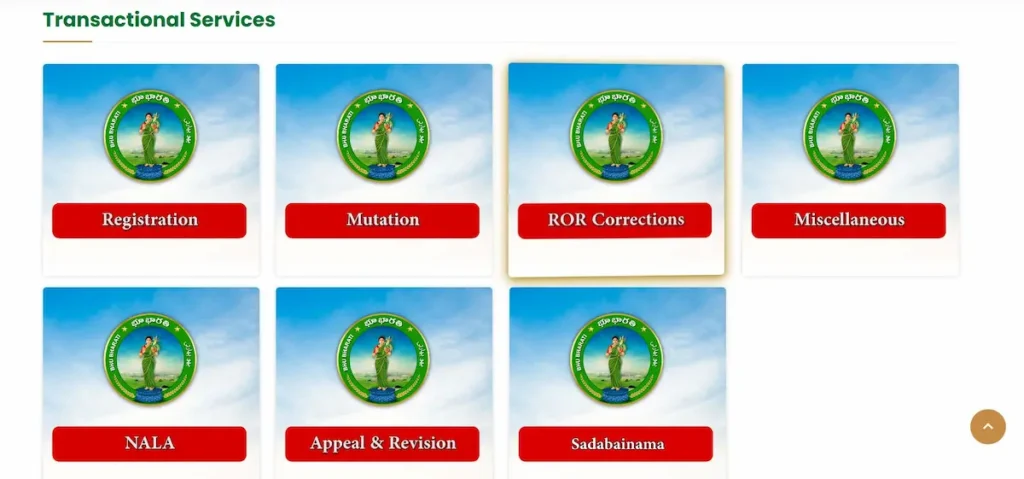
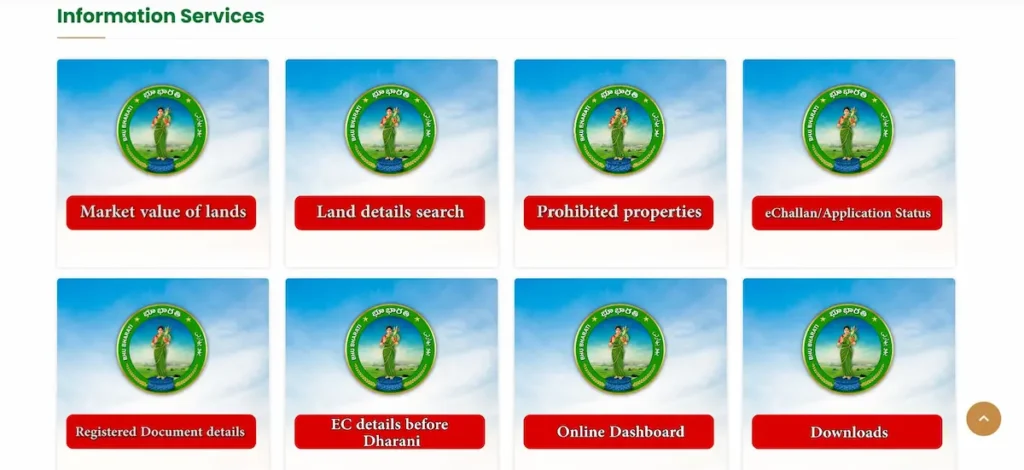
The Bhu Bharati homepage splits its services into two groups. “Transactional Services” need a citizen login. “Information Services” open without one. The tile names below are written exactly as they appear on the portal, so you can match them on screen.
Transactional Services (login needed)
| Tile on the portal | What it is for |
|---|---|
| Registration | Book a slot and register a sale, gift, mortgage, lease, exchange, partition or GPA of agricultural land |
| Mutation | Apply for mutation, including land bought before Bhu Bharati that was never mutated |
| ROR Corrections | Apply to correct an entry in your Record of Rights |
| Miscellaneous | Other applications, after login |
| NALA | Convert agricultural land to non-agricultural use; the system works out the charges before you book a slot |
| Appeal & Revision | Appeal against an order under Section 15 of the Act |
| Sadabainama | Regularise an unregistered sale under Section 6 of the Act |
Information Services (no login)
| Tile on the portal | What it shows |
|---|---|
| Market value of lands | The market value used for stamp duty, by survey number |
| Land details search | The Record of Rights entry for a survey number or passbook number |
| Prohibited properties | The Section 22A(1) prohibition lists, on registration.telangana.gov.in |
| eChallan/Application Status | The status of 23 types of application |
| Registered Document details | A document registered at a Tahsildar & Jt. Registrar office, found by document number and year |
| EC details before Dharani | Encumbrance details from before Dharani; this link currently opens an error page |
| Online Dashboard | A dashboard tile |
| Downloads | The Act (No. 1 of 2025) and G.O.Ms.No.36 and G.O.Ms.No.39, both dated 14.04.2025 |
| ROFR Land details search | Land covered under the Recognition of Forest Rights (ROFR) |
The top menu also has “About us”, “User Manuals”, “FAQ”, “తెలుగు”, “Login” and “Pilot Login”. The FAQ and User Manuals pages are worth reading before you apply for anything.
How to check Bhu Bharathi land details (భూమి వివరాలు)
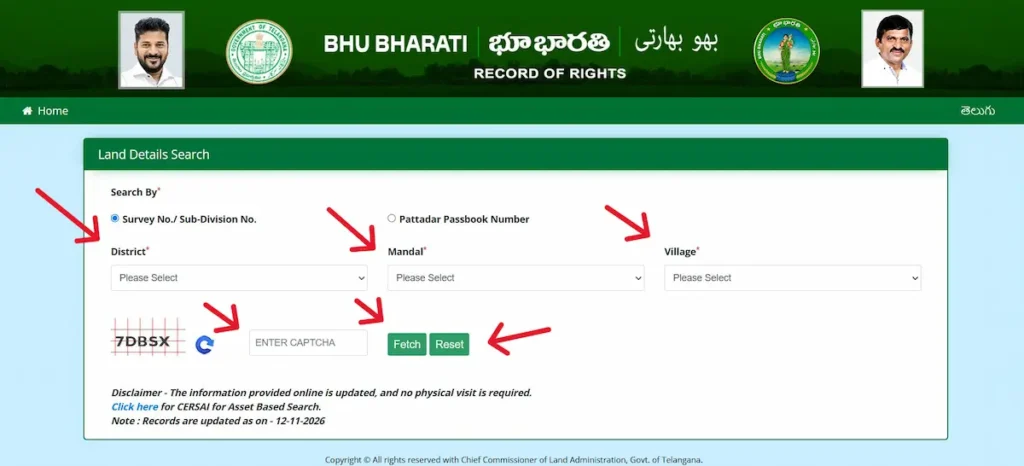
Open the “Land details search” tile on bhubharati.telangana.gov.in. Choose “Survey No./ Sub-Division No.” or “Pattadar Passbook Number”, fill in the fields, type the captcha, and click “Fetch”. You do not need to log in. The page also shows the date up to which its records are updated.
Method 1: search by survey number
- Go to bhubharati.telangana.gov.in and scroll down to “Information Services”.
- Click “Land details search”. A page titled “Land Details Search” opens.
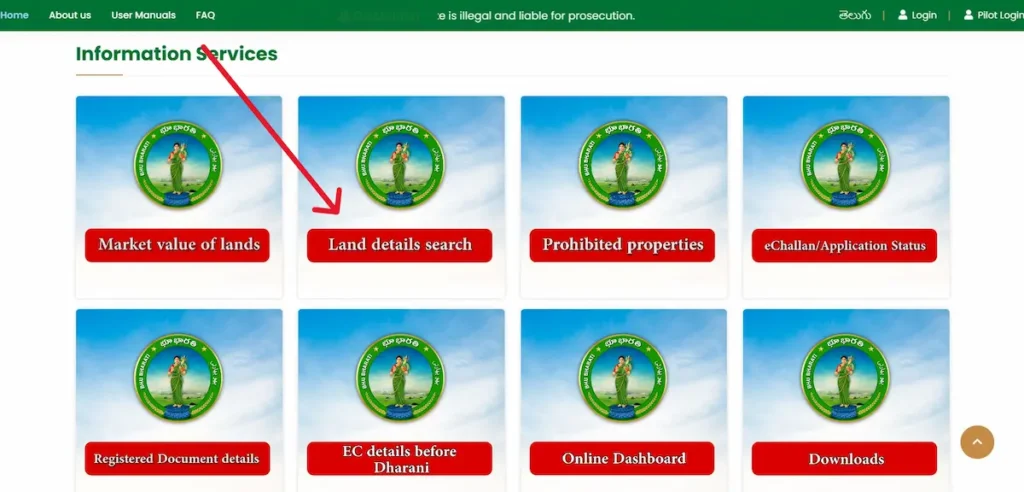
- Under “Search By”, leave “Survey No./ Sub-Division No.” selected.
- Choose your “District”, then “Mandal”, then “Village”. Each name appears in English and Telugu, for example “Rangareddy|రంగా రెడ్డి”.
- A new box, “Survey No./ Sub-Division No.”, appears. It is a drop-down list, not a box you type in. Pick your number from it.
- Type the letters from the captcha image into “ENTER CAPTCHA”. If you can’t read them, click the round arrow beside the image for a new one.
- Click “Fetch”. To start again, click “Reset”.
Method 2: search by Pattadar Passbook number
- On the same page, select “Pattadar Passbook Number”.
- The District, Mandal and Village boxes disappear. Only the “Pattadar Passbook Number” box remains.
- Type your passbook number and the captcha, then click “Fetch”.
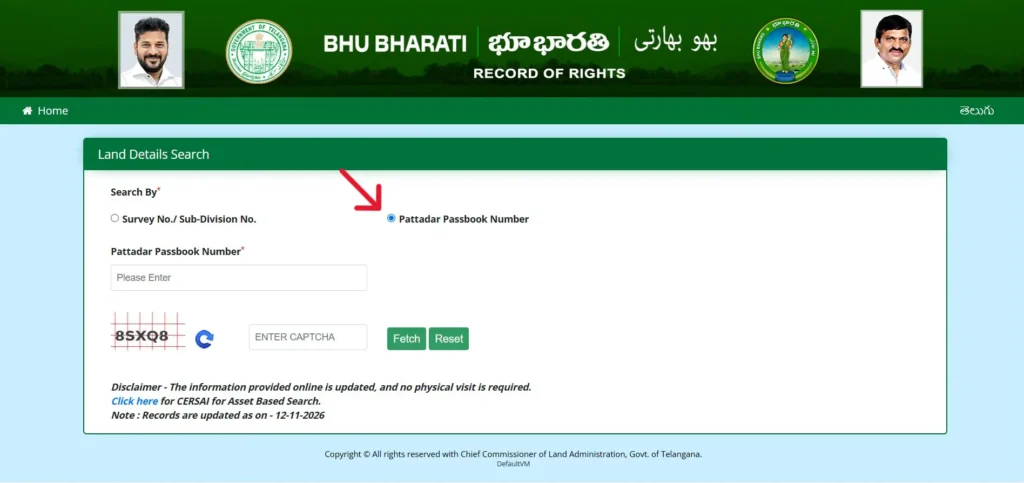
This method is quicker if you have your passbook (పట్టాదారు పాస్బుక్) in hand, because you skip the location lists.
What the result tells you
The result is your entry in the Record of Rights. Under Section 4(1) of the Act, that record holds the names of the owners, pattadars, occupants and mortgagees, and the nature and extent of their rights.
Read three things carefully. Is the pattadar’s name spelt correctly? Does the extent match your documents? Is any mortgage shown that you have already repaid? If anything is wrong, the law presumes it correct until it is proved wrong or amended (Section 11). Apply for a correction rather than ignoring it.
Download your ePPB from the same page
When a new Pattadar Passbook is issued, the paper copy is sent by post. According to the portal’s FAQ, an ePPB copy is issued the same day and “will also be available to download in Bhubharati land details search”.
Good to know
- The district list has 32 districts. Hyderabad is not one of them.
- The page states: “Disclaimer – The information provided online is updated, and no physical visit is required.”
- The page also links to CERSAI, the central registry of mortgages and other security interests, with the line “Click here for CERSAI for Asset Based Search”.
- The online view is free. A certified copy of your Record of Rights is a separate service with a fee (Section 12).
Can you do a Bhu Bharathi land details search by name?
No, not on the official portal. The “Land Details Search” page gives only two choices under “Search By”: “Survey No./ Sub-Division No.” and “Pattadar Passbook Number”. There is no box for the pattadar’s name. If a website shows you a “search by name” button, it is not describing the government portal. One related government page does take names: the CCLA’s “ROR-1B & Pahani Details” page (ccla.telangana.gov.in) can search by “Buyer Name” or “Seller Name”, but only for a past mutation, and its results are for information only.
What to do if you only know the owner’s name
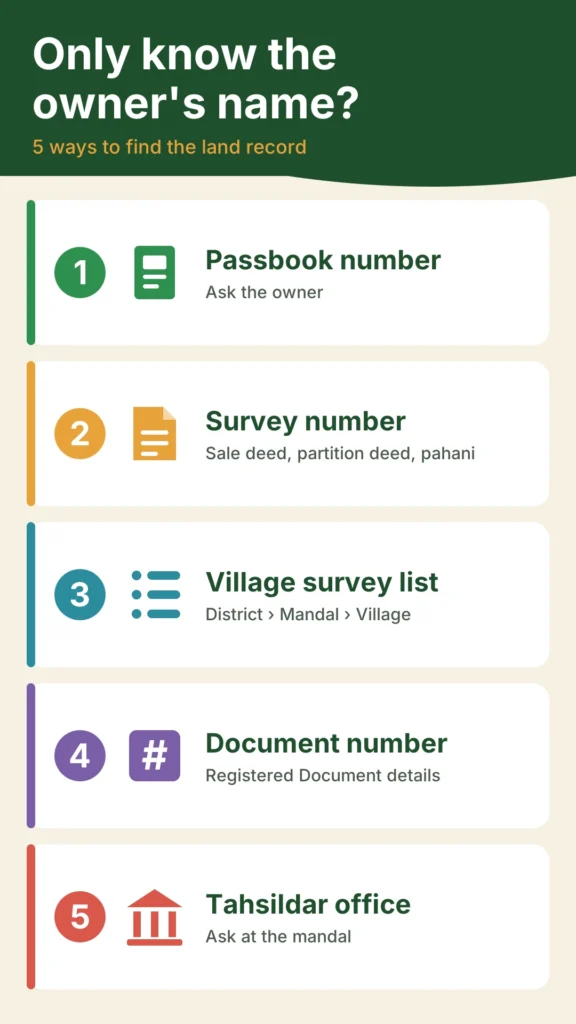
- Ask the owner for the passbook number. It is printed in the Pattadar Pass Book-cum-Title Deed. Choose “Pattadar Passbook Number” and type it in. You don’t need the district, mandal or village.
- Find the survey number in a document. A registered sale deed, partition deed or an older pahani (పహాణీ) extract names the survey number. Search with that.
- Go through the village’s survey-number list. After you choose District, Mandal and Village, the “Survey No./ Sub-Division No.” drop-down lists every survey number in that village. You can open them one at a time, typing a captcha for each. It is slow, but it is the only official way to search without a number.
- Use the document number, if you have it. “Registered Document details” finds a registered deed by “Document Number/Year”, “District” and “Tahsildar & Jt. Registrar office”.
- Ask at the mandal’s Tahsildar office. The Tahsildar is a Recording Authority for the village’s Record of Rights and can tell you the survey number.
About apps and sites that sell name search
Some private apps and websites charge for name-based land lookups. The Revenue Department does not run them. Before you rely on anything they show, check the same survey number in the official Land details search.
How to check the Bhu Bharathi prohibited list (Section 22A)
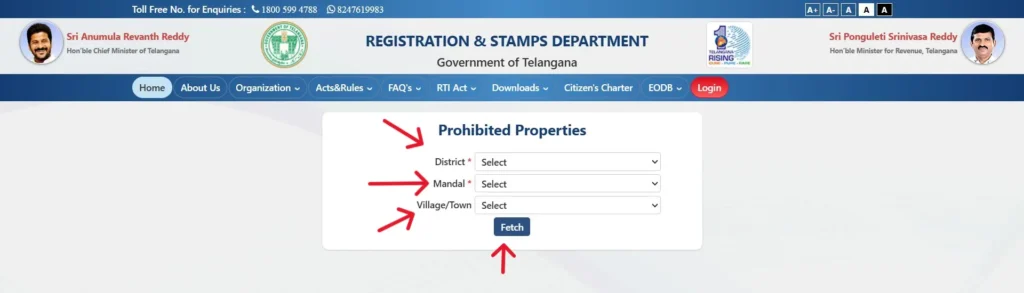
Click “Prohibited properties” on the Bhu Bharati homepage, then click “Click here”. This opens the “Prohibited Properties” page of the Registration & Stamps Department. Choose District, Mandal and Village/Town, click “Fetch”, and open each Section 22A(1) PDF for your village. You don’t need a login or a captcha.
Steps
- On bhubharati.telangana.gov.in, click the “Prohibited properties” tile.
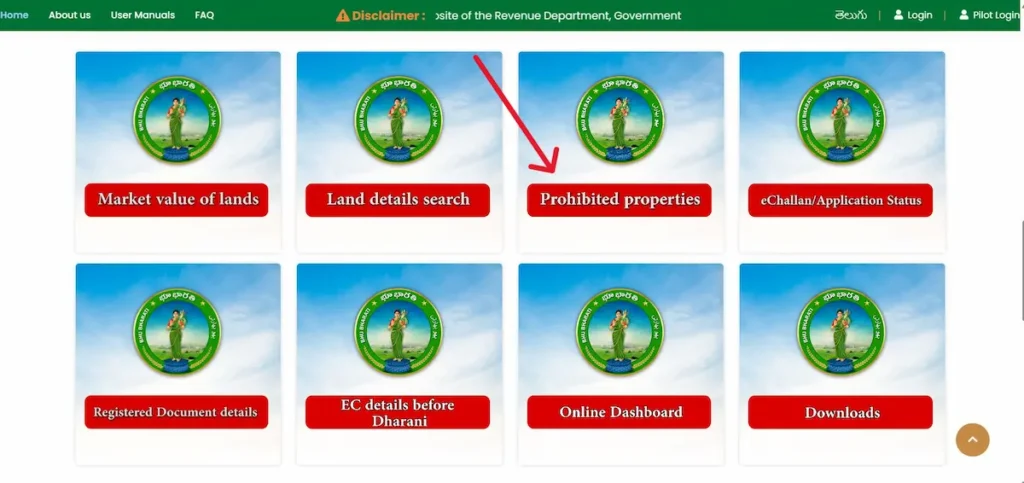
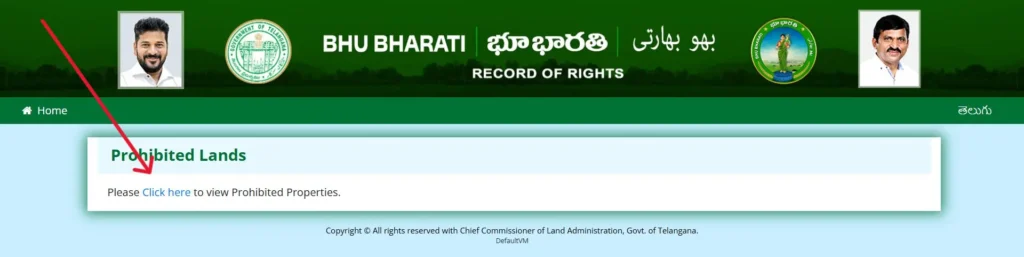
- A page titled “Prohibited Lands” says “Please Click here to view Prohibited Properties.” Click “Click here”.
- You move to registration.telangana.gov.in, on a page titled “Prohibited Properties”.
- Choose your “District”, then “Mandal”. This list has 33 districts, including Hyderabad.
- Choose “Village/Town”. It has no red star, but the search won’t run without it. If you skip it, you’ll see “Please select an item in the list.”
- Click “Fetch”.
- A box titled “SECTION 22A(1) : PROHIBITION LIST” appears. It has two columns, “Agriculture” and “Non-Agriculture”. Each column has PDF links for 22 A (1) (a), 22 A (1) (b), 22 A (1) (c)- Waqf, 22 A (1) (c)- Endowment, 22 A (1) (d), 22 A (1) (e) and “Court cases & Others”.
- Open every PDF in the column that applies to you and look for your survey number.
Waqf and Endowment lands are listed under clause (c). If you are buying land, check every category, not just one.
If your land is on the list by mistake
The official page names who to approach for each category:
| Category | Who to approach |
|---|---|
| Section 22A(1)(a), (b) and (d) | The concerned District Collector |
| Section 22A(1)(c), Waqf | CEO, Waqf |
| Section 22A(1)(c), Endowment | Commissioner, Endowment |
| Section 22A(1)(e) | The committee set up for this purpose in the Office of the CCLA |
You can also apply online. The portal’s FAQ says to apply in “Grievance relating to prohibited properties list”. A step-by-step PDF called “Grievance Relating to Inclusion in Prohibited Properties List” is on the portal’s “User Manuals” page. To follow your application, choose “Grievance related to wrong inclusion in Prohibited Property” in the application status page.
Errors in this list are a known problem. Telangana Today reported on 30 October 2026 that the Revenue Minister had, in August, blamed officials for mistakes in the 22A list and promised a fix within a month, and that the problem was still unresolved.
Bhu Bharathi EC: where to get an encumbrance certificate now
Bhu Bharathi has no general EC search tile, and its “EC details before Dharani” tile currently opens an error page. For agricultural land, a mortgage is recorded in the Record of Rights itself, so the Land details search is the first check, and the “Registered Document details” tile looks up one deed by its number and year. The full “Encumbrance Search(EC)” is on registration.telangana.gov.in and needs a login there. All four routes, step by step, are on our bhu bharathi ec page.
Bhu Bharathi map: is there a land map or village map online?
Yes, though no tile on the Bhu Bharathi homepage leads to it. The portal runs a map viewer at https://bhubharati.telangana.gov.in/gis/, which shows survey numbers and sub-division extents for a village, but not owner names. Since 2 April 2026, survey maps are also attached to land registrations in five pilot mandals: Kosgi, Kusumanchi, Aswaraopeta, Amangal and Vatpally. How to open the viewer and find your plot is explained on our bhu bharathi map page.
Bhu Bharathi login and citizen registration
Click “Login” at the top right of bhubharati.telangana.gov.in. Choose your role, enter your mobile number and password, type the captcha and click “Get OTP”. If you are new, click “Sign Up” first and register with your name and mobile number. You only need an account for transactional services. Land details and the prohibited list are open to everyone.
Create an account (Sign Up)
- On the Login page, find the line “New user please Sign Up” and click “Sign Up”.
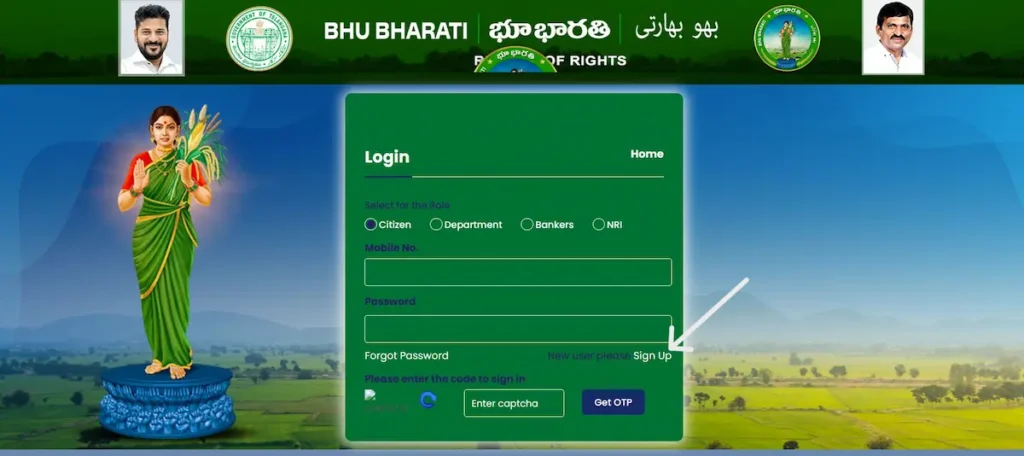
- A box titled “Sign Up to Bhu Bharati” opens, under “Personal Details”.
- Enter your “Name” and “Mobile No.”. Both are required.
- Click “Get OTP”. The OTP is sent by SMS to the mobile number you entered.
- Type the captcha into “ENTER CAPTCHA” and click “Validate & Register”.
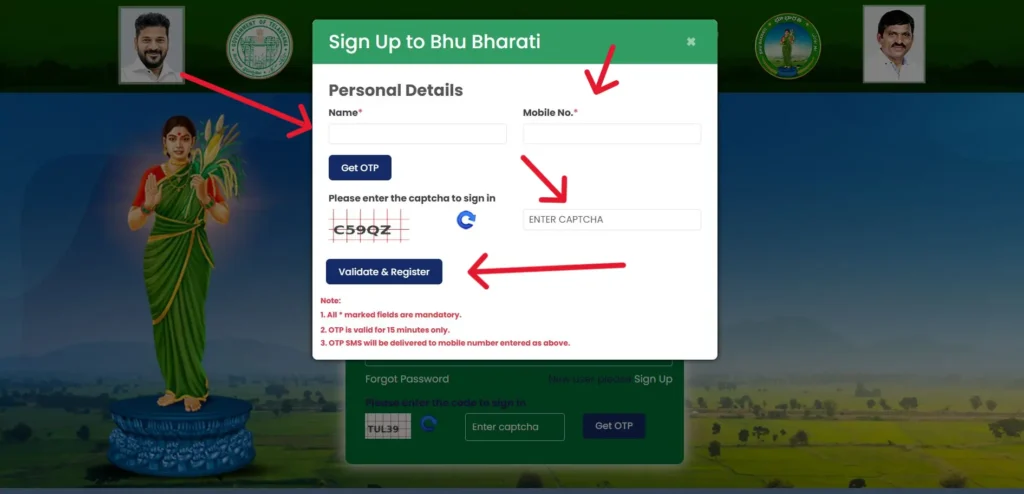
The box itself warns: “OTP is valid for 15 minutes only.” Keep your phone with you and finish in one go.
Log in
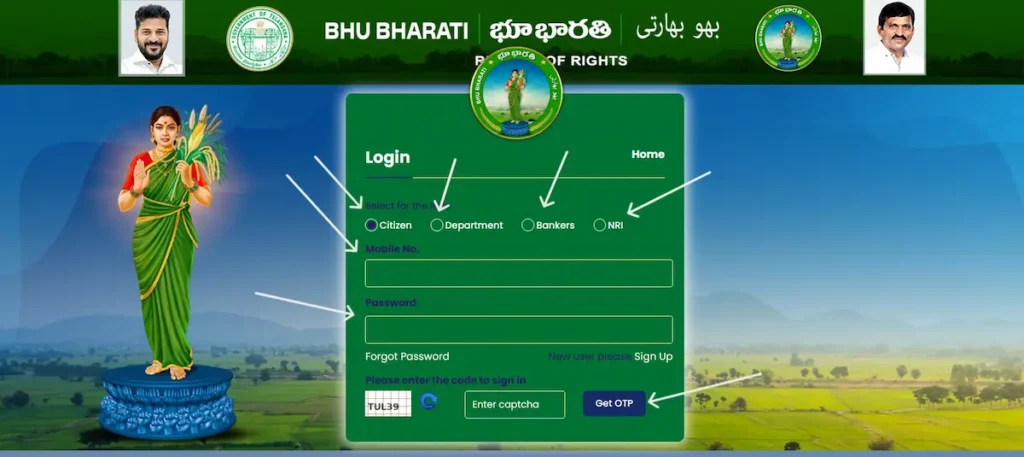
- Under “Select for the Role”, choose “Citizen”. The other roles are “Department”, “Bankers” and “NRI”.
- Enter your “Mobile No.” and “Password”.
- Type the code shown under “Please enter the code to sign in”.
- Click “Get OTP” and enter the OTP sent to your phone.
Forgot your password?
Click “Forgot Password” on the same page. The reset works with an OTP sent to your registered mobile number.
Login for NRIs
According to the portal’s FAQ, NRIs first register in the “NRI portal” module and then apply for a Pattadar Passbook. After that they can carry out transactions such as GPA. NRIs who have no Aadhaar card apply through the NRI portal with their passport, country and land details.
What is “Pilot Login”?
“Pilot Login” in the top menu opens a separate page with only “Farmer Login” and “Department Login”. It belongs to the Integrated Bhu Bharati pilot running in a few mandals. Unless you have been told to use it, use the normal “Login”.
Is there an official Bhu Bharathi app?
No. Google Play has no Bhu Bharati app from the Revenue Department, the CCLA or NIC, and the portal itself offers no app download link. Apps with similar names are made by private companies. The official website works in your phone’s browser, so you don’t need an app.
Your land records and your Aadhaar-linked login are sensitive. Never install an APK file sent through a link or a message.
If an official app is released, check two things before installing it: the publisher should be the Government of Telangana or NIC, and the app should be linked from bhubharati.telangana.gov.in itself.
For quick access, open bhubharati.telangana.gov.in/knowLandStatus in your phone’s browser and add it to your home screen from the browser menu.
Check your Bhu Bharathi application status
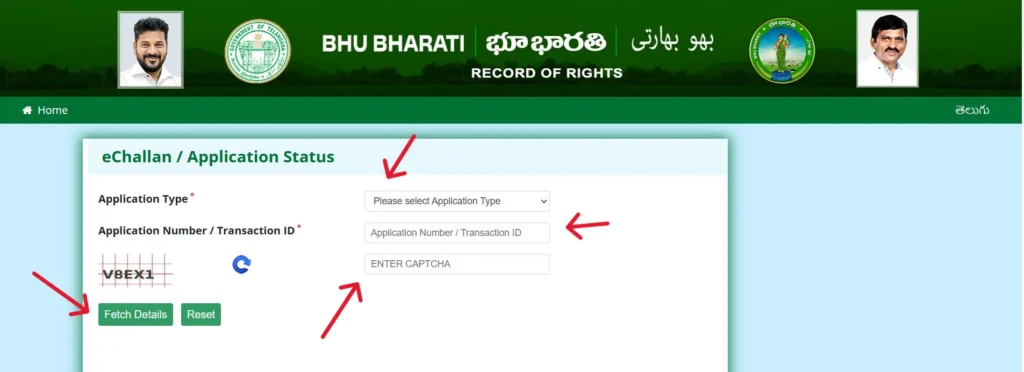
Open “eChallan/Application Status” on the Bhu Bharati homepage. Choose the “Application Type”, enter your “Application Number / Transaction ID”, type the captcha and click “Fetch Details”. You don’t need to log in. The portal’s own FAQ points to this page for checking any application. If your question is about a payment, our e challan status page covers the challan number, pass code and failed payments.
- Click “eChallan/Application Status”.
- In “Application Type”, choose the type that matches your application (full list below).
- Enter your “Application Number / Transaction ID”.
- Type the captcha in “Enter Captcha”.
- Click “Fetch Details”. Use “Reset” to clear the form.
The 23 application types you can track
| eChallan No. | Grievance related to Acquired Lands |
| Registration | Semi Urban Lands PPB |
| Succession | Application for GPA |
| Partition | Application for Duplicate PPB |
| NALA | Issue of PPB / NALA Conversion – House Sites |
| Pending NALA | Application for Khata Merging |
| Mutation | Court Case & Intimation |
| Organisation PPB | Application for Passbook Data Correction |
| NRI – PPB | Revenue Sadassulu Application |
| Aadhaar Seeding | Application for PPB – Court cases |
| Grievance related to wrong inclusion in Prohibited Property | Application for NALA without Passbook |
| Grievance related to Land matters |
If you filed your application at a Revenue Sadassulu (a village revenue meeting held to settle land issues), choose “Revenue Sadassulu Application”.
Market value of land for stamp duty
Click “Market value of lands” on the homepage. The page “View market value of lands for Stamp Duty” asks for the “District”, “Mandal”, “Village/City/Town” and “Survey/Sub-Division No.”. Type the captcha and click “Fetch”. No login is needed.
Wrong entry in Bhu Bharathi? The exact module to use
Log in and apply in the module that the portal’s own FAQ names for your problem. Most mistakes in a name, extent or land type, and a missing survey number, go through the “Modification Request Application”. The table below lists 15 common problems and where to apply for each. If the officer’s decision goes against you, you can appeal within 60 days.
| Your problem | Where to apply |
|---|---|
| Pattadar’s name spelt wrong, or the whole name needs changing | Modification Request Application → “Change of name” |
| Land nature, land classification, manner of acquisition or land type is wrong | Modification Request Application → the matching “Change of” option |
| Patta land shows “Marked as assigned land” | Modification Request Application → Change of Land Nature, Land Classification, Manner in which land acquired, or Land type |
| Extent is recorded wrongly | Modification Request Application → “extent Correction” |
| A survey number is missing, though you hold an old passbook | Modification Request Application → “Missing Survey number/ Sub division Number” |
| The same problem, but the pattadar has died | The same option, choosing “deceased pattadar” |
| Your land is shown as Government land | Modification Request Application → transfer of land from Notional Khata to Patta |
| Land is wrongly shown as NALA (non-agricultural) | Modification Request Application → change land usage from NALA to Agriculture |
| You converted to NALA before Bhu Bharati, but it still shows Agriculture | “Application for Pending NALA” |
| Part of the land was sold in square yards before Bhu Bharati but was not deducted | Modification Request Application → “part land sold out in Sq yard before Bhubharati” |
| You bought land before Bhu Bharati and it was never mutated | Citizen login → “Apply for Mutation” |
| Two khatas in one village, and your duplicate passbook was never printed | “Application for Khata Merging” (both khatas must carry the same Aadhaar number) |
| Passbook lost or damaged | “Apply for Duplicate PPB” (you need the PPB number and Aadhaar number) |
| A court decree is in your favour | “Application for PPB Court Case” (the District Collector decides) |
| You want a disputed survey number blocked from sale | “Court Cases & Intimation” (upload the court order) |
One thing catches many people out. When a grievance is approved, your passbook is not updated automatically. You have to apply separately in “Apply for Duplicate PPB”.
Appeals under Section 15: who hears them and how long you have
| Order passed by | First appeal to | Time limit | Second appeal to | Time limit |
|---|---|---|---|---|
| Tahsildar or Sub-Registrar, amending or refusing to amend the Record of Rights | Revenue Divisional Officer (RDO) | 60 days | District Collector, whose decision is final | 30 days |
| Revenue Divisional Officer | District Collector | 60 days | Land Tribunal, whose decision is “final and conclusive” | 30 days |
| A decision to issue a Bhudhaar Card or a Pattadar Pass Book-cum-Title Deed | Revenue Divisional Officer | 60 days | District Collector | 30 days |
Each time limit runs from the date the order is communicated to you. Until the government sets up a Land Tribunal, the Commissioner (CCLA) acts as the Land Tribunal (Section 14). File your appeal through the “Appeal & Revision” tile after logging in. Keep a copy of the order you are challenging and your acknowledgement.
Sadabainama: regularising an unregistered sale
A sadabainama (సాదాబైనామా) is a land sale made on plain paper without registration. Section 6 of the Act allows such sales to be regularised, but only within narrow limits. It covers small and marginal farmers who bought agricultural land this way before 02-06-2014, have been in possession for more than twelve years, and applied between 12-10-2020 and 10-11-2020. It does not cover transfers that break the land ceiling laws, the assigned lands law or the scheduled areas regulation (Section 6(3)). Applications are handled through the “Sadabainama” tile.
The Act gives no fixed calendar deadline for correcting a record. It says only that you can apply “within the prescribed period” (Section 4(5)). Don’t trust a site that quotes a specific last date without citing the rules.
Common Bhu Bharathi problems and how to fix them
Most Bhu Bharathi problems are one of two kinds: form mistakes you can fix on the spot, and errors in your record, which need an application. If the portal itself is down or the OTP never arrives, call the helpline on +91 40-29313999 (10 AM–5 PM).
Search and form problems
| Problem | Fix |
|---|---|
| Prohibited list: “Fetch” does nothing, or says “Please select an item in the list.” | Choose “Village/Town” as well. It has no red star, but it is required. |
| Hyderabad is missing from Land details search | The list has 32 districts and Hyderabad isn’t one. Non-agricultural and abadi land goes through the Sub-Registrar and municipal mutation instead (Act, Section 5(9)). |
| I can’t type in the survey number box | It is a drop-down. Choose District, Mandal and Village first, then pick your number. |
| The captcha keeps failing | Click the round arrow beside it for a new image and type it again. |
| OTP not received, or expired | The OTP goes by SMS to the number you entered and is “valid for 15 minutes only”. Check the number, then request a fresh OTP. |
| “EC details before Dharani” shows Error 404 | That link currently leads to an error page. Use the other EC routes in the EC section above. |
| I can’t search by the owner’s name | The portal has no name search. Use the passbook number or survey number. |
Record problems (apply after logging in)
| Problem | Fix |
|---|---|
| Survey number missing from my record | Modification Request Application → “Missing Survey number/ Sub division Number” |
| Name, extent or land type is wrong | Modification Request Application, using the matching option (see the table in “Wrong entry in Bhu Bharathi?”) |
| When selling: “the Sy.no has been sold Vide Doc.no registered at SRO” | If the sold extent has already been deducted, approach the District Collector’s office. The Collector’s login has a “Deletion of Sold out cases” option for this. |
| Duplicate passbook never sent for printing | You have two khatas with the same Aadhaar in that village. Apply in “Application for Khata Merging”. |
| Grievance approved, but passbook not updated | It is not automatic. Apply in “Apply for Duplicate PPB”. |
| Court case is over, but the survey number is still blocked | Apply in “Court Cases & Intimation” and upload the court order. The Collector examines it. |
| Land wrongly on the 22A prohibited list | Apply in “Grievance relating to prohibited properties list”, or approach the authority for that clause. |
| Application rejected | Appeal within 60 days of the order reaching you (Section 15). |
What changed in Bhu Bharathi in 2026
Three changes in 2026 matter most. An Integrated Bhu Bharati portal that joins revenue, survey and registration is being piloted in five mandals. Bhudhaar cards with a 14-digit land ID and a parcel map are being issued. And a statewide village re-survey is under way.
| Date | What happened | Source |
|---|---|---|
| 30 Oct 2026 | Record corrections reported as limited to pilot re-survey villages. The re-survey covers 2,720 villages (two per mandal), with 8,234 to follow. | Telangana Today |
| Ahead of Dasara 2026 | Bhudhaar card distribution announced for after Dasara, once the first phase of re-survey in 285 revenue villages was done. All 10,954 revenue villages to be covered in three phases. | Deccan Chronicle |
| 17 Jul 2026 | Cabinet ordered a Special Enquiry Team (SET) to probe the Dharani and Bhu Bharathi portals. Bhu Bharathi’s operation and maintenance handed to NIC. | Telangana Today |
| 10 Jul 2026 | Bhudhaar cards given to 476 farmers in Madhira constituency. The Revenue Minister said all farmers would get one within two years. | Deccan Chronicle |
| 21 Apr 2026 | First Bhudhaar card issued at Kusumanchi, Khammam, with a 14-digit number and the parcel map “Bhu Kamatha Patam-1”. | The Week; Deccan Chronicle |
| 2 Apr 2026 | Integrated Bhu Bharati pilot began in Kosgi, Kusumanchi, Aswaraopeta, Amangal and Vatpally mandals, with survey maps attached at registration. | Telangana Today; Deccan Chronicle |
What Bhudhaar means for you
Bhudhaar (also searched as Bhudhar or Bhoodhar) is a unique ID for each land parcel. Section 9 of the Act sets out how it works:
- Every parcel gets a Bhudhaar automatically, first a temporary number, then a permanent one.
- The permanent number is based on the parcel’s location, its shape from the coordinates of its corner points, and ownership in the Record of Rights.
- Bhudhaar cards are to be made available online to pattadars from a date the government notifies. One card may cover all parcels of the same pattadar.
- Government, local-body, community, endowment and Waqf land get numbers from a reserved series.
If you disagree with a Bhudhaar decision, you can appeal to the RDO within 60 days (Section 15(3)).
Buying agricultural land in Telangana: checks to do on Bhu Bharathi
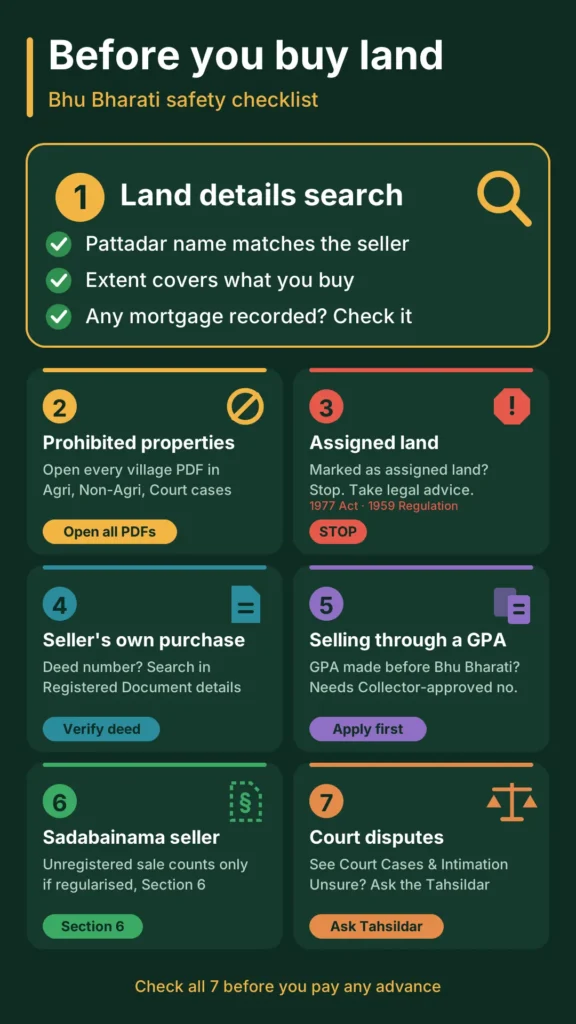
Before you pay, check three things yourself on the official sites. The seller’s name and the extent must match the Record of Rights. The survey number must not appear in any Section 22A(1) list for the village. And the seller must hold a Pattadar Pass Book-cum-Title Deed or a valid GPA.
- Land details search: the pattadar’s name matches the seller, the extent covers what you are buying, and check for any recorded mortgage.
- Prohibited properties: open every PDF for the village under both “Agriculture” and “Non-Agriculture”, including “Court cases & Others”.
- Assigned or scheduled-area land: the Registrar won’t register land whose transfer is barred by the Assigned Lands (Prohibition of Transfers) Act, 1977 or the Scheduled Areas Land Transfer Regulation, 1959 (Section 5(4)). If the record shows “Marked as assigned land”, stop and take legal advice.
- The seller’s own purchase: if you have the deed’s number, look it up in “Registered Document details”.
- Selling through a GPA: a GPA registered before Bhu Bharati must go through “Application for GPA/SPA/Executed GPA”. The holder can transact only with the GPA number issued after the Collector approves it.
- Sadabainama seller: an unregistered sale counts only if it was regularised under Section 6.
- Court disputes: a survey number can be blocked through “Court Cases & Intimation”. If in doubt, ask the Tahsildar office.
On registration day
Registration takes place at the Tahsildar cum Joint Sub Registrar office named on your slot booking receipt. Carry both passbooks, the original deed, the e-challan, and PAN and Aadhaar of both parties, with two witnesses.
This checklist is general information, not legal advice. For high-value or disputed land, consult an advocate.
Bhu Bharathi FAQs
What is the official Bhu Bharathi website?
bhubharati.telangana.gov.in. The Revenue Department, Government of Telangana runs it, the CCLA holds its copyright, and NIC built it. Other websites, including this one, are not official.
Has Bhu Bharathi replaced Dharani?
Yes. Bhu Bharathi went live on 14 April 2025 under the Telangana Bhu Bharati (Record of Rights in Land) Act, 2025. Records kept under the 2020 Dharani law are treated as the Record of Rights until a new one is prepared (Section 4(4)).
Do I need to log in to see land details?
No. “Land details search” works without a login. Search by survey or sub-division number after choosing district, mandal and village, or by Pattadar Passbook number. Then type the captcha and click “Fetch”.
Can I search Bhu Bharathi by owner name?
No. The portal searches only by survey number or passbook number. Get one of these from the owner or a registered document, or ask the mandal’s Tahsildar office. The CCLA’s ROR-1B & Pahani Details page can search by the buyer or seller name of a past mutation.
How do I check if land is on the prohibited list?
Click “Prohibited properties”, then “Click here”. On registration.telangana.gov.in, choose District, Mandal and Village/Town and click “Fetch”. Open each Section 22A(1) PDF under “Agriculture” and “Non-Agriculture”.
How do I get an EC for agricultural land?
First check for mortgages in Land details search, because the Act records mortgages in the Record of Rights. Look up a single deed in “Registered Document details”. A full encumbrance search on registration.telangana.gov.in needs a login.
Is there a Bhu Bharathi map?
Yes, though no homepage tile links to it. The portal’s map viewer at https://bhubharati.telangana.gov.in/gis/ shows survey numbers and sub-division extents, not owner names. In the pilot mandals, survey maps are also attached at registration.
How long do I have to appeal a wrong order?
Sixty days from the date the order reaches you. Appeal to the RDO against a Tahsildar’s order, or to the Collector against an RDO’s order. A second appeal must be filed within 30 days (Section 15).
How do I correct my name in Bhu Bharathi?
Log in and apply in “Modification Request Application” under “Change of name”. It covers spelling corrections, surname changes and complete name changes.
What is Bhudhaar?
A unique ID the Act gives every land parcel, first temporary and then permanent. The permanent number is based on the parcel’s location, its corner-point coordinates and ownership in the Record of Rights. The first card carried a 14-digit number.
What is the Bhu Bharathi helpline number?
+91 40-29313999, from 10 AM to 5 PM, as shown on the portal.
భూ భారతిలో భూమి వివరాలు ఎలా చూడాలి?
bhubharati.telangana.gov.in లో “Land details search” ఎంచుకోండి. సర్వే నంబర్ లేదా పట్టాదార్ పాస్బుక్ నంబర్ ఎంచుకోండి. జిల్లా, మండలం, గ్రామం ఎంచుకుని, captcha టైప్ చేసి “Fetch” నొక్కండి. లాగిన్ అవసరం లేదు.